Legacy code - version 1.2.1
The original AI Sandbox featured a REST based protocol and a “client” application. The sandbox app called out to a REST server API (which you developed), this made it easy for developers who were used to server-side programming and Swagger specifications, to start their AI journey.
Although development has moved to a new code base, the original downloads are still available.
The following documentation is taken from the original website:
Getting Started
Step 1 - download and run the client.
The easiest way to run the client is to download a platform-specific installer for Windows, Linux or Mac. Installing this way will add the application to your start menu and / or create a desktop launcher.
Alternatively, if you have a recent (version 11 or later) Java Runtime Environment installed, you can download the cross-platform JAR and launch the application with the command:
java -jar AISandbox-Client-version.jar
where version matches the version number you downloaded.
Note: due to the architecture restrictions of JavaFX, the JAR file will only run on Windows, Linux and Mac.
Step 2 - setup the simulation
After choosing a simulation to run, you will be shown a screen similar to this:
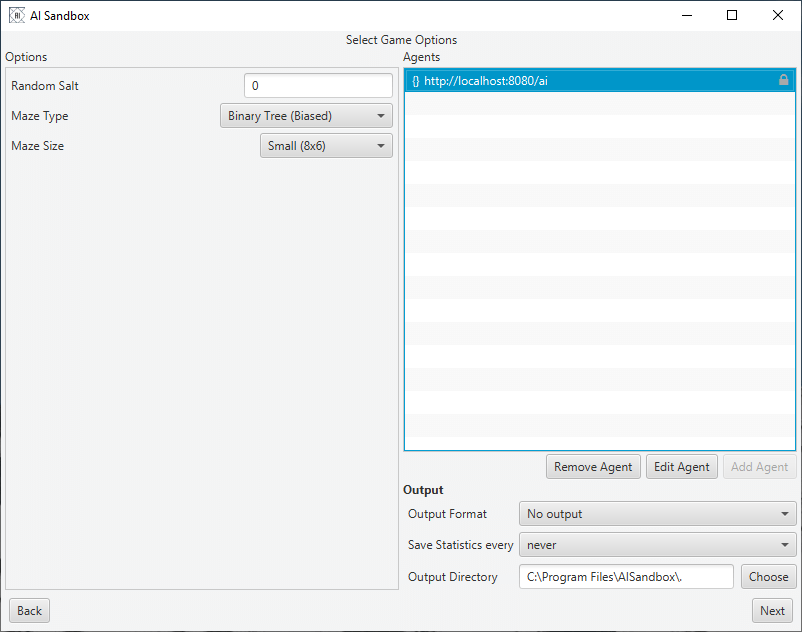
On the left hand side are options to tailor the simulation. This will be different for each scenario. The top right is where you configure your agents. Each agent is defined as a URL which the client will connect to.
Add an agent by pressing the add agent button then configure it by double-clicking on the URL.
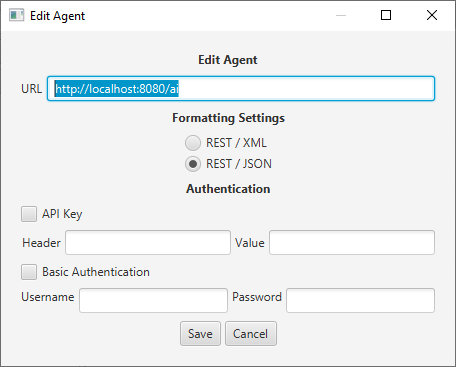
On the edit agent screen, you can change the agent endpoint as well as add authentication and choose between REST-JSON and REST-XML.
Returning to the main screen, the bottom right of the window will allow you to set up any output options. This includes the ability to take screenshots for any frame or export the output of the simulation as a video.
Step 3 Run Simulation
Clicking on ‘next’ will take you to the run screen
Pressing start will initialise the simulation, the output of which is shown in the main viewscreen.
The graphs at the bottom will summarise how your agent is running.
Scenarios
Multi-Armed Bandits
The Multi-Armed Bandit is one of the classic problems studied in probability theory and AI and it’s one of the first problems you are likely to look at when doing a Reinforcement Learning class. The basic premise is that you have a row of one-armed bandit machines, each tuned to pay out a reward based on a different random variable. When playing you have to decide between choosing to play with the bandit that you think will give you the highest reward, and playing with another bandit which will allow you to build up a more accurate picture of the rewards available.
This trade-off between exploration and exploitation can be seen in many real-world scenarios and research on advanced versions of the Multi-Armed Bandit problem is still ongoing nearly seventy years after the problem was first explored.
For more background information see the Wikipedia Article.
Goal
Write an AI that learns then selects the bandit which returns the highest reward.
Algorithms and Hints
- Create an AI that either picks a random bandit, or chooses the bandit that has returned the highest average reward. Select which of the two strategies to use for each pull based randomly ( based on a percentage). This is known as the e-greedy algorithm.
- Alter the algorithm so that all the random pulls are taken first.
Setup
At the start of each round, each bandit is assigned a different random variable with a normal distribution N(μ,σ²).
The following options are available when setting up the scenario:
| Parameter | Description |
|---|---|
| # Bandits | The number of bandits available, numbered 0…n-1. |
| # Pulls | The number of arm-pulls in each round. |
| Bandit Mean | How the mean of each bandit is chosen |
| Bandit Standard Deviation | How the standard deviation of each bandit is chosen |
| Update Rule | How the mean of each bandit is updated after each step |
| Random Salt | A repeatable salt for the random number generator – use ‘0’ to create a new value each time |
| Skip intermediate frames | If checked the screen (and output) will only be updated at the end of each round, rather than after every pull. This dramatically reduces the amount of time spend updating the UI. |
API Interface
The Swagger specification for this API can be downloaded here.
In each step the Sandbox Client will send the following to the AI server:
- history – the result of the last step (except for the first step of the first round), this consists of:
- sessionID – the session identifier for the previous step
- chosenBandit – the index of the bandit selected by the AI
- reward – the reward from the chosen bandit.
- sessionID – a session identifier, this will stay constant for the entire round.
- banditCount – the number of bandits available (numbered 0..n-1)
- pullCount – the number of times the bandits arm can be pulled in a round
- pull – the number of pulls already made this round
Note: If the number of pulls in a round is 100, then the pull parameter will range from 0 to 99.
JSON Example Request
{
  "history": {
    "sessionID": "DEF-5435",
    "chosenBandit": 4,
    "reward": 1.42
  },
  "sessionID": "ABC-23542342",
  "banditCount": 10,
  "pullCount": 10000,
  "pull": 0
}
JSON Example Response
{
  "arm": 3
}
XML Example Request
<?xml version="1.0" encoding="UTF-8"?>
<BanditRequest>
  <history>
    <sessionID>DEF-5435</sessionID>
    <chosenBandit>4</chosenBandit>
    <reward>1.42</reward>
  </history>
  <sessionID>ABC-23542342</sessionID>
  <banditCount>10</banditCount>
  <pullCount>10000</pullCount>
  <pull>0</pull>
</BanditRequest>
XML Example Response
<?xml version="1.0" encoding="UTF-8"?>
<BanditResponse>
  <arm>3</arm>
</BanditResponse>
Graphical Output
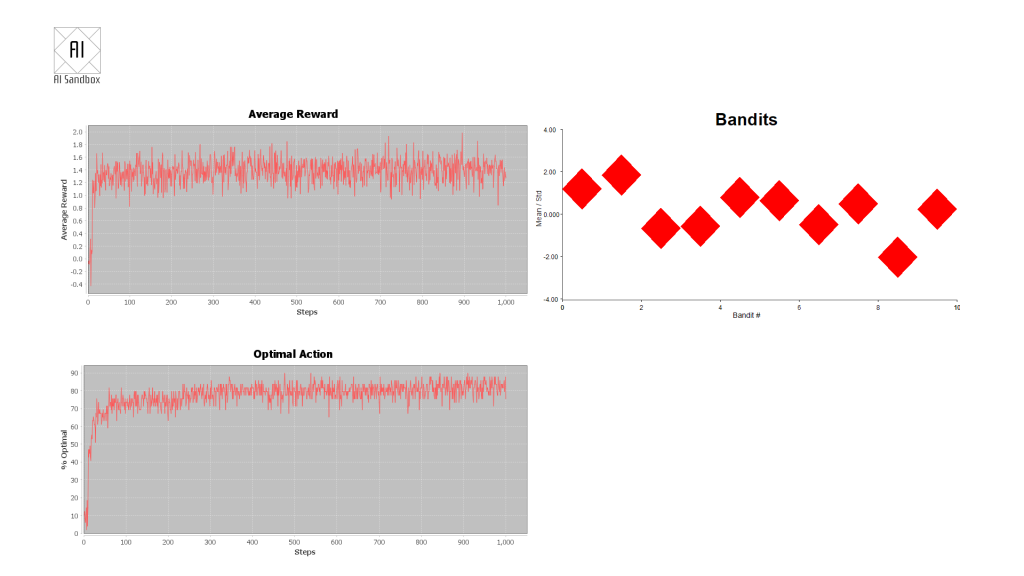
The graphical output shows three charts:
Average reward – the reward from each step of the round, averaged over all rounds.
Optimal action – the average percentage that the AI picks the best bandit (the bandit with the highest mean value) at each step in the round.
The current mean (centre of each diamond) and standard deviation (top and bottom of each diamond) of each of the bandits.
Statistics Output
The statistics file will show the average reward and the amount of times each step has chosen the best answer, averaged over all rounds.
| Step | Ave Reward | % Optimal Action |
|---|---|---|
| 0 | 0.11180486767982283 | 8.0 |
| 1 | -0.16001485097160476 | 6.000000000000003 |
| 2 | 0.01309801032724169 | 6.000000000000001 |
Mazes
The Maze scenario places the AI agent inside a randomly generated maze. The agent can move about the maze, bumping into walls and exploring the paths, until it finds the finish square. Once at the finish square, the agent is returned to the beginning to repeat the process. The goal is to explore the maze and find the shortest path from start to finish. Unlike in a physical maze the start and finish are not always placed at the edges.
Mazes can be generated in several different styles and sizes.
Binary Tree
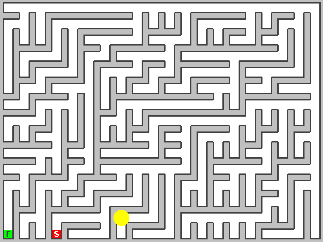
A binary tree maze is the simplest of the mazes implemented but contains a heavy diagonal bias.
Sidewinder
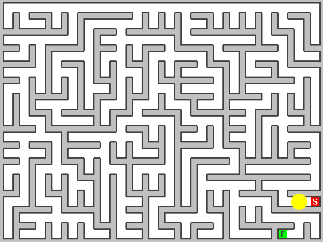
While still biased (the top row will always be a single run of open squares) this looks more like a typical maze than the Binary Tree.
Recursive Backtracker
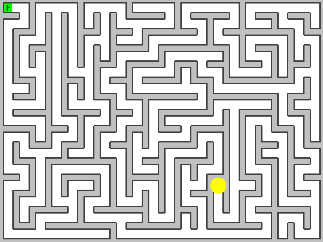
This is the maze that most people will recognise, it has many long twisting passages which makes for long solutions.
Braided
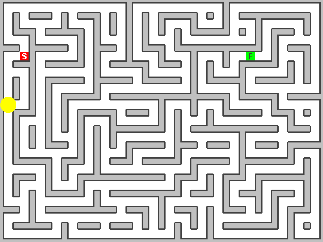
The braided maze is similar to the recursive backtracker, but with all dead-ends removed. Because of this the maze may feature loops and open areas. This can create challenges for some AIs as there may be multiple routes to the same point.
Algorithms and Hints
- This scenario is designed to be used as an introduction into Q-Learning, and the small mazes can be solved and optimised very quickly.
- Because the maze is discrete and unchanging you could also use a search algorithm (such as depth first) to explore and find the quickest route.
Further Challenges
- Two of the algorithms create biased mazes (Binary Tree and Sidewinder) can you use knowledge of this bias to speed your solver up?
- On mazes generated by the sidewinder algorithm, the start position is usually on the bottom row and the AI can easily navigate to the top row. This effectively bisects the maze, given that the finish position is placed as far as possible from the start, can you use this information to prioritise the search?
- Can you navigate the maze without memorising where you have been?
API Interface
The Swagger specification for this API can be downloaded ( here)[https://files.aisandbox.dev/swagger/maze.yaml].
The API is implemented as a single POST action which contains:
- The configuration of the board, consisting of:
- Board ID – this is unique to the maze that is being played.
- Valid Moves – the possible directions to move in, normally “North”, “South”, ”East” and “West”.
- Width – the width of the board
- Height – the height of the board
- (Optional) The result of the last move
- The previous position
- The action that was taken
- A numerical reward (hitting a wall=-1000, taking a step=-1, finding the exit=+1000) for the last action.
- The resulting position.
- The current position
The result is always a move command followed by one of the valid directions.
Notes:
- Positions are represented in X, Y coordinates with (0,0) at the top left.
- Agents are automatically reset to the start position after finding the exit. Because of this the
JSON Example Request
{
  "config": {
    "boardID": "2e2e83e5-9ca4-48f3-a6b4-ba1e0061fdfa",
    "validMoves": [
      [
        "North",
        "South",
        "East",
        "West"
      ]
    ],
    "width": 10,
    "height": 20
  },
  "history": {
    "lastPosition": {
      "x": 3,
      "y": 4
    },
    "action": "East",
    "reward": -10.5,
    "newPosition": {
      "x": 3,
      "y": 4
    }
  },
  "currentPosition": {
    "x": 3,
    "y": 4
  }
}
JSON Example Response
{
  "move": "North"
}
XML Example Request
<?xml version="1.0" encoding="UTF-8"?>
<MazeRequest>
  <config>
    <boardID>2e2e83e5-9ca4-48f3-a6b4-ba1e0061fdfa</boardID>
    <validMoves>
      <0>North
    </0>
  </validMoves>
  <width>10</width>
  <height>20</height>
</config>
<history>
<lastPosition>
  <x>3</x>
  <y>4</y>
</lastPosition>
<action>East</action>
<reward>-10.5</reward>
<newPosition>
  <x>3</x>
  <y>4</y>
</newPosition>
</history>
<currentPosition>
<x>3</x>
<y>4</y>
</currentPosition>
  </MazeRequest>
XML Example Response
<?xml version="1.0" encoding="UTF-8"?>
<MazeResponse>
  <move>North</move>
</MazeResponse>
Mine Hunter
Mine Hunter pits the AI against a minefield! A known quantity of mines has been distributed across a grid of squares and the AI agent must work out where they are. To help, each uncovered square will show how many mines are in the surrounding squares.
The grid is represented as an array of characters:
| Character | Description |
|---|---|
| F | A flagged mine |
| f | An incorrectly flagged empty space (game over) |
| # | A covered square |
| X | An exploded mine (game over) |
| . | An uncovered square with no neighbouring mines |
| 1-8 | An uncovered square with n neighbouring mines |
and organised in a two-dimensional array (with 0,0 at the top left).
Example Board

JSON Representation
"board": [
"#1",
"#1",
"11"
]
XML Representation
<board>#1</board>
<board>#1</board>
<board>11</board>
Note: in this example the correct response would be to place a flag at 0,1.
Goal
Write an AI agent that can solve as many boards as possible, this can be measured by a moving average which is shown on the output.
Algorithms and Hints
There are quite a few algorithms that can be used to solve this scenario:
- Rules based solutions – These rely on recognising predefined (hand coded) patterns that occur in most games examples of these can be found on the minesweeper wiki.
- Constraints based solutions – A board can be considered as a series of constraint based problems, with each square being a mine (value 1) or not (value 0). Each numbered square is a constraint which needs to be met for a solution to be valid.
- Monti Carlo simulations – Rather than trying to deduce where the mines are, you may like to try to generate lots of random boards based on the number of remaining undiscovered mines. Filtering these solutions if they don’t match the available knowledge. Then estimating the probability of each uncovered square being a mine.
- Guessing – If all else fails, don’t be afraid to just guess!
API Interface
The Swagger specification for this API can be downloaded here.
In each step, the Sandbox Client will send the following information to the AI server:
- (Optional) the result of the last step, this consists of:
- The boardID (unique identifyer) of the board being played.
- The result at the end of the last move, either “PLAYING”, “WON”, “LOST”. If the result is PLAYING that means the previous moves were successful, but there are still uncovered or unflaged squares remaining. The new board will be a continuation of the last game. If the result is “WON” or “LOST” then a new board will have been generated.
- The boardID of the current board.
- The board represented as a series of character strings (see example above).
- The number of flags still to be placed.
The AI agent should respond with one or more moves, each move consists of:
- The location (x,y) of the move, with (0,0) being the top left square.
- Should this move place a flag (flag=true) or uncover a square (flag=false).
Note: there is no limit to the number of moves that can be included in each response. However, if a move results in the game ending, subsequent guesses will be ignored rather than carried over to the next game.
JSON Example Request
{
  "lastMove": {
    "boardID": "1233-5678-90abc-2435",
    "result": "LOST"
  },
  "boardID": "1234-1234-1234-1234",
  "board": [
    "##1..",
    "##1..",
    "221..",
    "#1..."
  ],
  "flagsRemaining": 3
}
JSON Example Response
{
  "moves": [
    {
      "x": 1,
      "y": 1,
      "flag": true
    }
  ]
}
XML Example Request
<?xml version="1.0" encoding="UTF-8"?>
<MineRequest>
  <lastMove>
    <boardID>1233-5678-90abc</boardID>
    <result>LOST</result>
  </lastMove>
  <boardID>1234-1234-1234-1234</boardID>
  <board>##1..</board>
  <board>##1..</board>
  <board>221..</board>
  <board>#1...</board>
  <flagsRemaining>3</flagsRemaining>
</MineRequest>
XML Example Response
<?xml version="1.0" encoding="UTF-8"?>
<MineResponse>
  <moves>
    <x>1</x>
    <y>1</y>
    <flag>true</flag>
  </moves>
</MineResponse>
Twisty Puzzles
Twisty puzzles are a subset of combination puzzles, where the AI has to unscramble a three-dimensional puzzle by rotating (or twisting) the sides until each side is a solid block of colour. Most famously these include the Rubix Cube, (invented by Ernő Rubik in 1974,) a cube made of 26 smaller cubes that rotate around a central point; but the family of puzzles have expanded to include all sorts of shapes.
Notation and Scoring
A lot of confusion for these puzzles is generated by the labelling of the moves and the different scoring systems available. Here (as far as possible) we have adopted the World Cube Association standards as set out in the WCA regulations, (section 12) and use the outer block turn metric (OBTM) to count moves.
Notation for NxNxN Cubes (From WCA):
- Face Moves (outer slice):
- Clockwise, 90 degrees: F (front face), B (back face), R (right face), L (left face), U (upper face), D (bottom face).
- Counter-clockwise, 90 degrees: F’, B’, R’, L’, U’, D’.
- 180 degrees: F2, B2, R2, L2, U2, D2.
- Outer Block Moves (outer slice with adjacent inner slices). For each of the moves defined below, n is the total number of slices to move, which must be in the range 1 < n < N (where N is the number of layers in the puzzle). n may be also be omitted, for an implicit value of n = 2 slices. Outer Block Moves are:
- Clockwise, 90 degrees: nFw, nBw, nRw, nLw, nUw, nDw.
- Counter-clockwise, 90 degrees: nFw’, nBw’, nRw’, nLw’, nUw’, nDw’.
- 180 degrees: nFw2, nBw2, nRw2, nLw2, nUw2, nDw2.
- Rotations (entire puzzle):
- Clockwise, 90 degrees: x (same direction as R or L’), y (same direction as U or D’), z (same direction as F or B’).
- Counter-clockwise, 90 degrees: x’ (same direction as R’ or L), y’ (same direction as U’ or D), z’ (same direction as F’ or B).
- 180 degrees: x2, y2, z2.
- Outer Block Turn Metric (OBTM) is defined as:
- Each move of the categories Face Moves and Outer Block Moves is counted as 1 move.
- Each move of the Rotations category is counted as 0 moves.
Note – Although the WCA notes that dropping the “2” prefix for outer block moves when n=2 is optional, here it is done in all cases.
Algorithms and Hints
Although in theory all twisty puzzles could be solved by a simple search algorithm, (as all future states can be accurately predicted) in reality all but the smallest puzzles have far too many possible combinations actually do this.
| Puzzle Type | Positions (Possible States) |
|---|---|
| Cube 2x2x2 | 3,674,160 |
| Cube 3x3x3 | 43,252,003,274,489,856,000 |
| Cube 4x4x4 | 7.4 × 1045 |
| Cube 5x5x5 | 2.8 × 1074 |
| Cube 6x6x6 | 1.6 × 10116 |
| Cube 7x7x7 | 2.0 × 10160 |
Instead, you could try splitting the puzzle into several smaller tasks (i.e. top layer, sides, bottom corners, whole cube) with the solution to each sub-puzzle keeping the previous state intact.
Alternatively, it has been shown that by using a deep neural network to predict how many moves a state is away from a solution, existing search algorithms (such as A*) can be adapted to produce good results.
API Interface
The Swagger specification for this API can be downloaded here.
The API is implemented as a single POST action which contains:
- The type of the puzzle, current valid values are:
- Cube 2x2x2 (OBTM)
- Cube 3x3x3 (OBTM)
- Cube 4x4x4 (OBTM)
- Cube 5x5x5 (OBTM)
- Cube 6x6x6 (OBTM)
- Cube 7x7x7 (OBTM)
- Cube 8x8x8 (OBTM)
- Cube 9x9x9 (OBTM)
- Cube 10x10x10 (OBTM)
- A list of valid moves.
- The current state of the puzzle, encoded as a string.
- (Optional) the result of the last move, this contains:
- The starting state.
- The move made.
- The end state.
- If this move resulted in a solved puzzle.
The response should be the desired move, expressed as a string.
Making multiple moves
To make multiple moves in the same network response, separate the moves by spaces. For example:
<move>R D' R' U2</move>
The history object of the next request will only show the last move made.
State Encoding
The state of the puzzle is encoded as a string, with each character representing the colour of a single face.
| Character | Colour |
|---|---|
| ‘W’ | White |
| ‘O’ | Orange |
| ‘G’ | Green |
| ‘R’ | Red |
| ‘B’ | Blue |
| ‘Y’ | Yellow |
Each face is encoded row by row, from top left to bottom right.
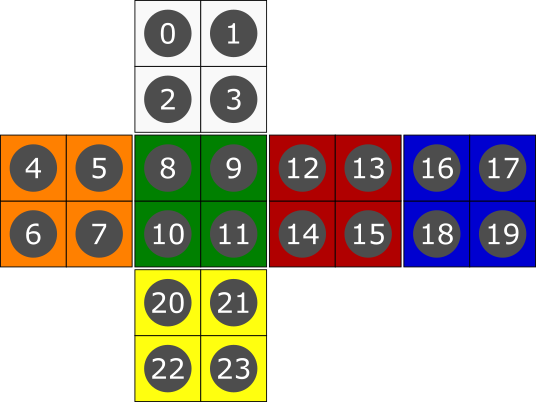
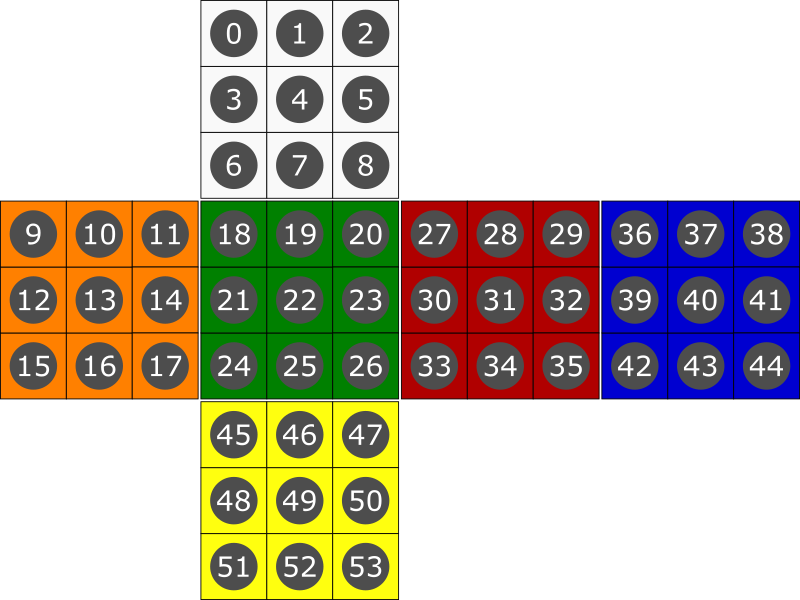
JSON Example Request
{
"history": {
"startState": "OYWYYBRYOYBYRRRWRRBRYGGYGGRGOBGOOYBGOOBGBBOORWWGWWWBWW",
"moves": "D'",
"endState": "OYWYYBRYOYBYRRRGGRBRYGGYYBGGOBGOOOOROOBGBBWRRGWWWWWWWB",
"success": false
},
"puzzleType": "Cube 3x3x3 (OTBM)",
"moves": [
"R", "L", "U","D","R'","L'"
],
"state": "OYWYYBRYOYBYRRRGGRBRYGGYYBGGOBGOOOOROOBGBBWRRGWWWWWWWB"
}
###JSON Example Response
{
"move": "R D R'"
}
XML Example Request
<?xml version="1.0" encoding="UTF-8"?>
<TwistyRequest>
 <history>
<startState>OYWYYBRYOYBYRRRWRRBRYGGYGGRGOBGOOYBGOOBGBBOORWWGWWWBWW</startState>
  <moves>D'</moves>
<endState>OYWYYBRYOYBYRRRGGRBRYGGYYBGGOBGOOOOROOBGBBWRRGWWWWWWWB</endState>
  <success>false</success>
</history>
<puzzleType>Cube 3x3x3 (OTBM)</puzzleType>
<moves>R</moves>
<moves>L</moves>
<moves>U</moves>
<moves>D</moves>
<moves>R'</moves>
<moves>L'</moves>
<moves>U'</moves>
<moves>D'</moves>
<state>OYWYYBRYOYBYRRRGGRBRYGGYYBGGOBGOOOOROOBGBBWRRGWWWWWWWB</state>
</TwistyRequest>
XML Example Response
<?xml version="1.0" encoding="UTF-8"?>
<TwistyResponse>
	<move>R D R'</move>
</TwistyResponse>